---
title: NetSuite Purchase Orders Integration
description: Discover how to set up the NetSuite Purchase Orders integration with Precoro.
---
[Skip to content](https://help.precoro.com/netsuite-suiteapp-purchase-orders-integration#main-content)
[Contact us](https://help.precoro.com/kb-tickets/new?hsLang=en) [Customer portal](https://help.precoro.com/tickets-view?hsLang=en)
[](https://app.precoro.com/login)
Open main navigation
Close main navigation
- [Contact us](https://help.precoro.com/kb-tickets/new)
- [Customer portal](https://help.precoro.com/tickets-view)
- [Contact Us](https://share.hsforms.com/1-5JilMA_Qv6AOSVjFtNhDg14slf)
[Contact Us](https://share.hsforms.com/1-5JilMA_Qv6AOSVjFtNhDg14slf)
Hi there! How can we help you today?
- There are no suggestions because the search field is empty.
1. [Knowledge Base](https://help.precoro.com/?hsLang=en)
2. [Precoro Integrations](https://help.precoro.com/precoro-integrations?hsLang=en)
3. [NetSuite Integration](https://help.precoro.com/precoro-integrations?hsLang=en#netsuite-integration)
# NetSuite Purchase Orders Integration
## Learn how the NetSuite Purchase Orders integration works with the Precoro SuiteApp.
#### TABLE OF CONTENTS
- [How to Set Up Purchase Orders Integration](https://help.precoro.com/netsuite-suiteapp-purchase-orders-integration#how-to-set-up)
- [How to Send Pending Purchase Orders to NetSuite](https://help.precoro.com/netsuite-suiteapp-purchase-orders-integration#pending)
- [Integrated Fields and Their Synchronization Method](https://help.precoro.com/netsuite-suiteapp-purchase-orders-integration#fields)
- [Primary Information Mapping](https://help.precoro.com/netsuite-suiteapp-purchase-orders-integration#primary)
- [Classification Mapping](https://help.precoro.com/netsuite-suiteapp-purchase-orders-integration#classification)
- [Attachments Mapping](https://help.precoro.com/netsuite-suiteapp-purchase-orders-integration#attachments)
- [How the Items Mapping Works](https://help.precoro.com/netsuite-suiteapp-purchase-orders-integration#item-mapping)
- [Custom Fields for Documents and Items Integration](https://help.precoro.com/netsuite-suiteapp-purchase-orders-integration#custom-fields)
- [Character Limits for Purchase Orders Fields in NetSuite](https://help.precoro.com/netsuite-suiteapp-purchase-orders-integration#limits)
- [FAQs](https://help.precoro.com/netsuite-suiteapp-purchase-orders-integration#faqs)
### How to Set Up Purchase Orders Integration
To set up the Purchase Orders integration:
1. In Precoro, go to **Configuration → Integrations.**
2. Locate **NetSuite** integration card → click the **Update Settings** button.
3. In the **Documents to Send** field, select the **Approved Purchase Orders** option.
4. Click **Save** to record the changes.
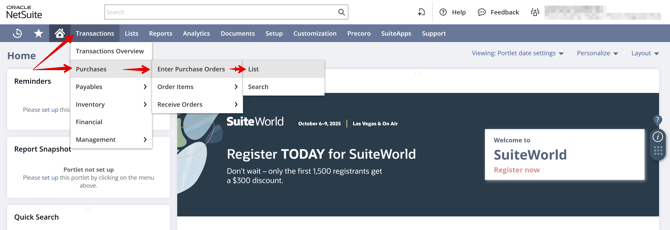
The Purchase Orders in NetSuite will be integrated into the **Transactions → Purchases → Enter Purchase Orders → List** section.
[](https://help.precoro.com/hubfs/List.png?hsLang=en)
#### How to Send Pending Purchase Orders to NetSuite
To enable sending POs in the **Pending** status to NetSuite, please contact our Support Team.
Once the feature is activated, it will be available for users with the **Create** and **Approve Purchase Orders** roles.
When the document acquires the **Approved** status, the current system logic will work out, and the document will be sent to NetSuite automatically.
### Integrated Fields and Their Synchronization Method
The integration uses **one-way synchronization**, therefore:
- Documents created in Precoro will be transferred to NetSuite.
- Documents created in NetSuite will not be sent to Precoro.
Here’s how the data mapping works:
#### Primary Information Mapping
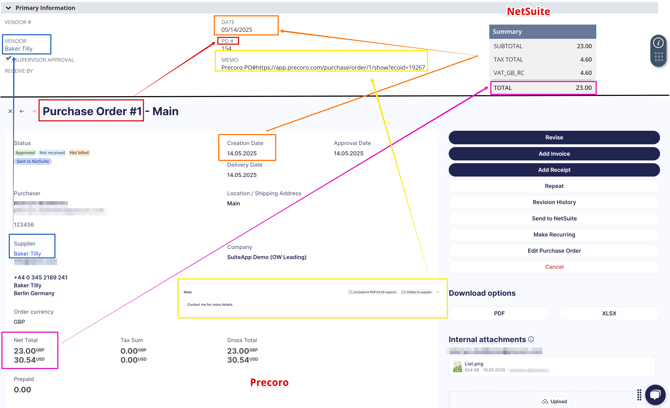
| **Field in Precoro** | **Field in NetSuite** |
| --- | --- |
| Purchase Order # | PO # |
| Supplier | Vendor |
| Creation Date | Date |
| Delivery Date | Receive By |
| Net Total | Total |
| Note | Memo (integrated with the text and direct link to the PO) |
| [](https://help.precoro.com/hubfs/Synchronization-2.png?hsLang=en) | |
#### Classification Mapping
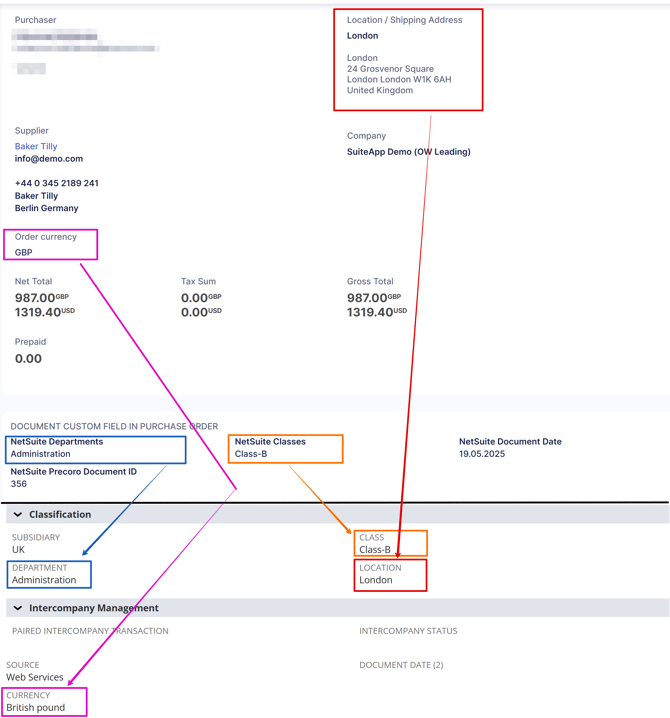
| **Field in Precoro** | **Field in NetSuite** |
| --- | --- |
| Location / Shipping Address | Location |
| Order Currency | Currency |
| NetSuite Departments | Department |
| NetSuite Classes | Class |
| [](https://help.precoro.com/hubfs/Classification%20Mapping.png?hsLang=en) | |
#### Attachments Mapping
Attachments from Precoro Purchase Orders are transferred to the **Files** tab in NetSuite. The internal or external status of the attachment is not carried over.
### How the Items Mapping Works
**💡Please note:** You can find more detailed information about items integration [here](https://help.precoro.com/how-to-sync-items-with-netsuite-suiteapp?hsLang=en).
The way items are added in Precoro affects how they appear in NetSuite:
- Items added via the **Item Management** page using the **Add Item** button that were previously integrated will be transferred to the **Items** tab in NetSuite.
- Items added from the **Item Management** page → **Add Item** button, but not integrated, will be transferred to the **Expenses** tab in NetSuite.
- Items added manually using the **Add empty row** button will be transferred to the **Expenses** tab in NetSuite.
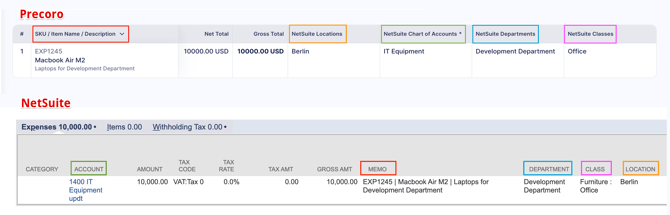
Here’s how the mapping of manually added items works:
| **Field in Precoro** | **Field in NetSuite** |
| --- | --- |
| SKU\|Name\|Description | Memo |
| Price | Amount |
| NetSuite Chart of Accounts | Account |
| NetSuite Departments | Department |
| NetSuite Classes | Class |
| NetSuite Customers | Customer or Project |
| NetSuite Locations | Location |
| [](https://help.precoro.com/hubfs/Expenses%20Precoro-NS.png?hsLang=en) | |
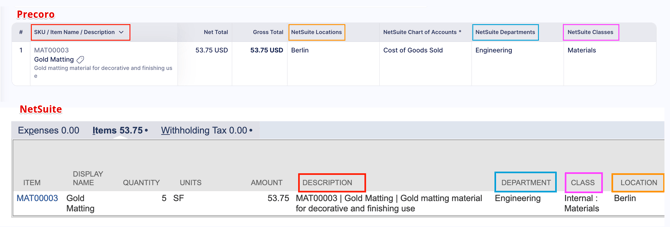
Here’s how the mapping of items added from the Item Management page works:
| **Fields in Precoro** | **Fields in NetSuite** |
| --- | --- |
| SKU\|Name\|Description | Description |
| Ordered / Unit | Quantity |
| Price | Amount |
| NetSuite Departments | Department |
| NetSuite Classes | Class |
| NetSuite Customers | Customer or Project |
| NetSuite Locations | Location |
| [](https://help.precoro.com/hubfs/Items%20Precoro-NS.png?hsLang=en) | |
### Custom Fields for Documents and Items Integration
You can find more detailed information on the integration of [Classes](https://help.precoro.com/how-to-sync-classes-with-netsuite-suiteapp?hsLang=en), [Customers and Projects](https://help.precoro.com/how-to-sync-customers-and-projects-with-netsuite-suiteapp?hsLang=en), [Locations](https://help.precoro.com/how-to-sync-locations-with-netsuite-suiteapp?hsLang=en), [Charts of Accounts](https://help.precoro.com/how-to-sync-chart-of-accounts-with-netsuite-suiteapp?hsLang=en), and [Departments](https://help.precoro.com/how-to-sync-departments-with-netsuite-suiteapp?hsLang=en) by the corresponding links.
In general, here’s how the integration works:
- The Chart of Accounts is integrated as the Custom Fields for Items only.
- Classes, Locations, and Departments can be integrated both as Custom Fields for Items and Documents.
- Customers and Projects are integrated as the Custom Fields for Items only.
### Character Limits for Purchase Orders Fields in NetSuite
NetSuite enforces character limits for certain fields:
- Note: 927 characters
- Combined character count in the SKU, Name, and Description fields for each item: 927 characters
- Item quantity: 10 characters
### FAQs
**How do I integrate the PO number?**
If custom numbering is enabled for Purchase Orders in Precoro, the custom PO number will be sent to NetSuite. Otherwise, the system-generated number will be used.
**What happens if I cancel the document in Precoro?**
If you cancel the document in Precoro, it will be automatically removed from NetSuite.
- [Precoro Setup](https://help.precoro.com/precoro-setup?hsLang=en#main-content)
- [Configurations](https://help.precoro.com/precoro-setup?hsLang=en#configurations)
- [User Management](https://help.precoro.com/precoro-setup?hsLang=en#user-management)
- [Custom Fields and Forms](https://help.precoro.com/precoro-setup?hsLang=en#custom-fields-and-forms)
- [Supplier management](https://help.precoro.com/precoro-setup?hsLang=en#supplier-management)
- [Working with Items](https://help.precoro.com/precoro-setup?hsLang=en#working-with-items)
- [Approval Workflow](https://help.precoro.com/precoro-setup?hsLang=en#approval-workflow)
- [Location Management](https://help.precoro.com/precoro-setup?hsLang=en#location-management)
- [Precoro Payments](https://help.precoro.com/precoro-setup?hsLang=en#precoro-payments)
- [Two-factor authentication](https://help.precoro.com/precoro-setup?hsLang=en#two-factor-authentication)
- [Security](https://help.precoro.com/precoro-setup?hsLang=en#security)
- [US Based Server](https://help.precoro.com/precoro-setup?hsLang=en#us-based-server)
- [How to use Precoro](https://help.precoro.com/how-to-use-precoro?hsLang=en#main-content)
- [Warehouse Requests](https://help.precoro.com/how-to-use-precoro?hsLang=en#warehouse-requests)
- [Requests for Proposals](https://help.precoro.com/how-to-use-precoro?hsLang=en#requests-for-proposals)
- [Purchase Requisitions](https://help.precoro.com/how-to-use-precoro?hsLang=en#purchase-requisitions)
- [Purchase Orders](https://help.precoro.com/how-to-use-precoro?hsLang=en#purchase-orders)
- [Service Orders](https://help.precoro.com/how-to-use-precoro?hsLang=en#service-orders)
- [Receipts](https://help.precoro.com/how-to-use-precoro?hsLang=en#receipts)
- [Invoices](https://help.precoro.com/how-to-use-precoro?hsLang=en#invoices)
- [Expenses](https://help.precoro.com/how-to-use-precoro?hsLang=en#expenses)
- [Budgeting](https://help.precoro.com/how-to-use-precoro?hsLang=en#budgeting)
- [Inventory](https://help.precoro.com/how-to-use-precoro?hsLang=en#inventory)
- [Reports](https://help.precoro.com/how-to-use-precoro?hsLang=en#reports)
- [AP Inbox and Intelligent AP Automation](https://help.precoro.com/how-to-use-precoro?hsLang=en#ap-inbox-and-intelligent-ap-automation)
- [Working with documents](https://help.precoro.com/how-to-use-precoro?hsLang=en#working-with-documents)
- [Suppliers Portal](https://help.precoro.com/how-to-use-precoro?hsLang=en#suppliers-portal)
- [Supplier Registration](https://help.precoro.com/how-to-use-precoro?hsLang=en#supplier-registration)
- [Attachments, Filters, and Search](https://help.precoro.com/how-to-use-precoro?hsLang=en#attachments-filters-and-search)
- [Mobile App](https://help.precoro.com/how-to-use-precoro?hsLang=en#mobile-app)
- [FAQs and Troubleshooting](https://help.precoro.com/how-to-use-precoro?hsLang=en#faqs-and-troubleshooting)
- [Precoro Integrations](https://help.precoro.com/precoro-integrations?hsLang=en#main-content)
- [QuickBooks Online Integration](https://help.precoro.com/precoro-integrations?hsLang=en#quickbooks-online-integration)
- [NetSuite Integration](https://help.precoro.com/precoro-integrations?hsLang=en#netsuite-integration)
- [Xero Integration](https://help.precoro.com/precoro-integrations?hsLang=en#xero-integration)
- [API Requests and Webhooks](https://help.precoro.com/precoro-integrations?hsLang=en#api-requests-and-webhooks)
- [SSO Setting](https://help.precoro.com/precoro-integrations?hsLang=en#sso-setting)
- [Google Integration](https://help.precoro.com/precoro-integrations?hsLang=en#google-integration)
- [Power BI](https://help.precoro.com/precoro-integrations?hsLang=en#power-bi)
- [Integration with Slack](https://help.precoro.com/precoro-integrations?hsLang=en#integration-with-slack)
- [PunchOut Catalogs](https://help.precoro.com/precoro-integrations?hsLang=en#punchout-catalogs)
- [Integrations via Connectors](https://help.precoro.com/precoro-integrations?hsLang=en#integrations-via-connectors)
- [Bill.com Integration](https://help.precoro.com/precoro-integrations?hsLang=en#bill-com-integration)
- [Integration with Microsoft Teams](https://help.precoro.com/precoro-integrations?hsLang=en#integration-with-microsoft-teams)
- [Precoro Updates](https://help.precoro.com/precoro-updates?hsLang=en#main-content)
- [Releases, 2026](https://help.precoro.com/precoro-updates?hsLang=en#releases-2026)
- [Releases, 2025](https://help.precoro.com/precoro-updates?hsLang=en#releases-2025)
- [Releases, 2024](https://help.precoro.com/precoro-updates?hsLang=en#releases-2024)
- [Releases, 2023](https://help.precoro.com/precoro-updates?hsLang=en#releases-2023)
- [API Updates](https://help.precoro.com/precoro-updates?hsLang=en#api-updates)
- [General changes](https://help.precoro.com/precoro-updates?hsLang=en#general-changes)
[](https://precoro.com/)
Copyright © 2026, Precoro
```json
{
"@context" : "https://schema.org",
"@type" : "VideoObject",
"contentUrl" : "https://1903299.fs1.hubspotusercontent-na1.net/hubfs/1903299/PO.mp4",
"dateModified" : "2025-05-19T08:31:33.924Z",
"duration" : "PT28S",
"height" : 1798,
"name" : "PO",
"thumbnailUrl" : "https://1903299.fs1.hubspotusercontent-na1.net/hubfs/1903299/PO.mp4/medium.jpg",
"uploadDate" : "2025-05-19T08:31:30.642Z",
"width" : 3832
}
```
```json
{
"@context" : "https://schema.org",
"@type" : "VideoObject",
"contentUrl" : "https://1903299.fs1.hubspotusercontent-na1.net/hubfs/1903299/Attachments.mp4",
"dateModified" : "2025-05-19T09:38:12.377Z",
"duration" : "PT12S",
"height" : 1798,
"name" : "Attachments",
"thumbnailUrl" : "https://1903299.fs1.hubspotusercontent-na1.net/hubfs/1903299/Attachments.mp4/medium.jpg",
"uploadDate" : "2025-05-19T09:38:09.217Z",
"width" : 3832
}
```