---
title: "Latest Updates: app.precoro.com on May 28, app.precoro.us on June 11."
description: Learn about the latest updates from May.
---
[Skip to content](https://help.precoro.com/latest-updates-app.precoro.com-on-may-28-app.precoro.us-on-june-11#main-content)
[Contact us](https://help.precoro.com/kb-tickets/new?hsLang=en) [Customer portal](https://help.precoro.com/tickets-view?hsLang=en)
[](https://app.precoro.com/login)
Open main navigation
Close main navigation
- [Contact us](https://help.precoro.com/kb-tickets/new)
- [Customer portal](https://help.precoro.com/tickets-view)
- [Contact Us](https://share.hsforms.com/1-5JilMA_Qv6AOSVjFtNhDg14slf)
[Contact Us](https://share.hsforms.com/1-5JilMA_Qv6AOSVjFtNhDg14slf)
Hi there! How can we help you today?
- There are no suggestions because the search field is empty.
1. [Knowledge Base](https://help.precoro.com/?hsLang=en)
2. [Precoro Updates](https://help.precoro.com/precoro-updates?hsLang=en)
3. [Releases, 2026](https://help.precoro.com/precoro-updates?hsLang=en#releases-2026)
# Latest Updates: app.precoro.com on May 28, app.precoro.us on June 11.
## Learn about the latest updates from May.
#### TABLE OF CONTENTS
- [Notice Improved Tax Recognition in AP Inbox](https://help.precoro.com/latest-updates-app.precoro.com-on-may-28-app.precoro.us-on-june-11#tax)
- [View Multi-Entity Financial Data in Reports](https://help.precoro.com/latest-updates-app.precoro.com-on-may-28-app.precoro.us-on-june-11#reports)
- [Sync All Core Documents with NetSuite](https://help.precoro.com/latest-updates-app.precoro.com-on-may-28-app.precoro.us-on-june-11#netsuite)
- [Use Amazon PunchOut with Enterprise Subscription](https://help.precoro.com/latest-updates-app.precoro.com-on-may-28-app.precoro.us-on-june-11#amazon)
- [New in Mobile](https://help.precoro.com/latest-updates-app.precoro.com-on-may-28-app.precoro.us-on-june-11#mobile)
- [Use Precoro Payments on Mobile](https://help.precoro.com/latest-updates-app.precoro.com-on-may-28-app.precoro.us-on-june-11#mobile-payments)
- - [Try Customizable Shortcuts for Document Creation](https://help.precoro.com/latest-updates-app.precoro.com-on-may-28-app.precoro.us-on-june-11#mobile-shortcuts)
- [Optimize Total Calculations with % Discounts on Items](https://help.precoro.com/latest-updates-app.precoro.com-on-may-28-app.precoro.us-on-june-11#discounts)
### Notice Improved Tax Recognition in AP Inbox
Invoices in AP Inbox now have accurate totals even if a supplier’s tax rate doesn't directly map to your company's predefined taxes. To support this, we enabled adding taxes as line items, including cases where tax rates are enabled in Basic Settings.
Here’s how Precoro handles tax data in AP Inbox:
- Finds tax rate in the recognized data;
- Compares it with tax rate defined in your company or legal entity;
- If there’s a match, the tax appears as tax % in the invoice;
- If not, Precoro adds the total tax amount as a Tax-type item.
As a result, you’ll see fewer discrepancies in recognized invoices and will save time manually adjusting taxes.
### View Multi-Entity Financial Data in Reports
If your company uses Multi-Entity Management, reports will now show totals in legal entity’s currency.
To support LE-level currency settings, we’ve also added new columns to custom reports:
- The **General Data** section now includes totals in LE currency and Legal Entity Currency fields.
- The **Item Data** section now includes totals in LE currency.
We’ve also updated Budget Usage and Budget vs. Actual preconfigured reports. They now have a Legal Entities Using this Budget column, which shows all LEs included in the corresponding budget.
### Sync All Core Documents with NetSuite
NetSuite integration can now sync purchase orders, receipts, invoices, and credit notes at once.
What this update means for you:
- **Single source of truth**—Manage your Procure-to-Pay process in Precoro.
- **Data consistency**—Keep data aligned across systems.
- **Flexibility**—Make changes with automated credit note handling.
- **Control over spend**—Use Precoro's approvals and matching end-to-end.
**💡 Please note**: This feature is currently in Beta. To start using it:
1. Reach out to your Customer Success Manager to enable the functionality.
2. Once activated, open **NetSuite Configuration**, select **Core Document Set** in the **Documents to send** field, and save the changes.
### Use Amazon PunchOut with Enterprise Subscription
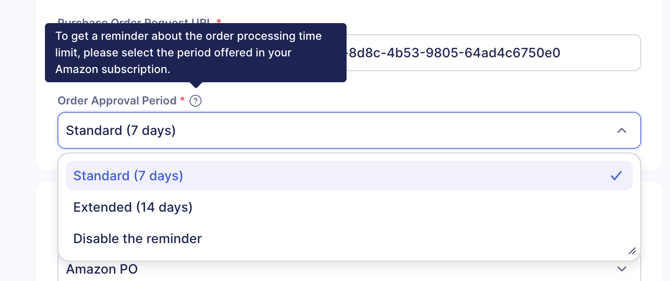
Amazon PunchOut now supports subscription-based order approval periods.
- If your subscription offers a 14-day order processing period (like Business Prime Enterprise Subscription), you can take up to **14 days** to review and approve the order in Precoro.
- For lower-tier subscription, the orders have to be sent to Amazon in **7 days**.
To ensure the correct processing timeframe is applied, navigate to Configuration → Marketplace Configuration → Amazon PunchOut and select the correct option in **Order Approval Period**.
[](https://help.precoro.com/hubfs/amazon%20subscription.png?hsLang=en)
### New in Mobile
Starting June 1, a new mobile app version will be available globally. Please update the app to use the newest features.
#### Use Precoro Payments on Mobile
Precoro now helps you control your entire procure-to-pay cycle, including the ability to make payments directly from your mobile device.
Consider setting up Precoro Payments to:
- **Approve on the fly**: Fully control spend and authorize payments before money leaves your account.
- **Track in real-time**: Keep procurement and finance in sync with complete visibility from your phone.
- **Save time and money**: Cut down operational costs and transaction friction with just a few taps.
**💡 Please note**: To access this feature, please set up Precoro Payments in the web app. To do so, check out [this guide](https://help.precoro.com/how-to-set-up-a-financial-account?hsLang=en) and contact our support team to assist you.
*Precoro partners with Stripe Payments Company for money transmission services.*
#### Try Customizable Shortcuts for Document Creation
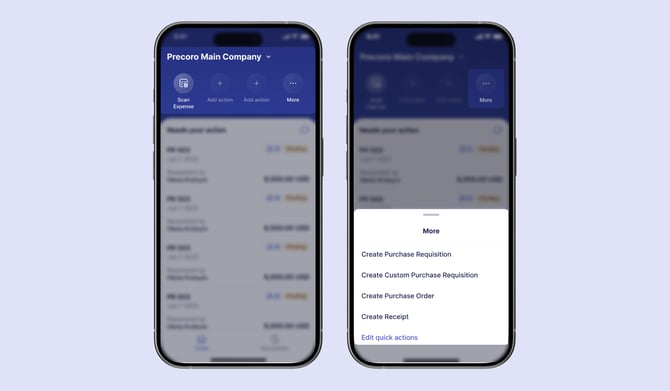
Our mobile app now offers **Quick Actions**: shortcuts on the Home page that allow you to create a document as soon as you open the app!
Here’s how to set them up:
1. Open Home in the mobile app.
2. Tap **Add action**.
3. Select an action you want to access from this screen.
To create other documents or edit quick actions, tap More on the right, then select the option you need. You can also press and hold any shortcut to see the option to remove it.
[](https://help.precoro.com/hubfs/Quick%20Actions.jpg?hsLang=en)
### Optimize Total Calculations with % Discounts on Items
To ensure more consistent calculations and smoother order processing, Precoro now supports only percentage-based item-level discounts. The fixed amount discount option has been removed.
You can still:
- Add percentage-based item-level discounts,
- Delete amount-based item-level discounts in previously created documents,
- Repeat documents while preserving amount-based discounts in items.
However, it is no longer possible to add new amount-based discounts to items or restore deleted ones.
Precoro will keep discounts on all previously created documents to keep your data intact.
- [Precoro Setup](https://help.precoro.com/precoro-setup?hsLang=en#main-content)
- [Configurations](https://help.precoro.com/precoro-setup?hsLang=en#configurations)
- [User Management](https://help.precoro.com/precoro-setup?hsLang=en#user-management)
- [Custom Fields and Forms](https://help.precoro.com/precoro-setup?hsLang=en#custom-fields-and-forms)
- [Supplier management](https://help.precoro.com/precoro-setup?hsLang=en#supplier-management)
- [Working with Items](https://help.precoro.com/precoro-setup?hsLang=en#working-with-items)
- [Approval Workflow](https://help.precoro.com/precoro-setup?hsLang=en#approval-workflow)
- [Location Management](https://help.precoro.com/precoro-setup?hsLang=en#location-management)
- [Precoro Payments](https://help.precoro.com/precoro-setup?hsLang=en#precoro-payments)
- [Two-factor authentication](https://help.precoro.com/precoro-setup?hsLang=en#two-factor-authentication)
- [Security](https://help.precoro.com/precoro-setup?hsLang=en#security)
- [US Based Server](https://help.precoro.com/precoro-setup?hsLang=en#us-based-server)
- [How to use Precoro](https://help.precoro.com/how-to-use-precoro?hsLang=en#main-content)
- [Warehouse Requests](https://help.precoro.com/how-to-use-precoro?hsLang=en#warehouse-requests)
- [Requests for Proposals](https://help.precoro.com/how-to-use-precoro?hsLang=en#requests-for-proposals)
- [Purchase Requisitions](https://help.precoro.com/how-to-use-precoro?hsLang=en#purchase-requisitions)
- [Purchase Orders](https://help.precoro.com/how-to-use-precoro?hsLang=en#purchase-orders)
- [Service Orders](https://help.precoro.com/how-to-use-precoro?hsLang=en#service-orders)
- [Receipts](https://help.precoro.com/how-to-use-precoro?hsLang=en#receipts)
- [Invoices](https://help.precoro.com/how-to-use-precoro?hsLang=en#invoices)
- [Expenses](https://help.precoro.com/how-to-use-precoro?hsLang=en#expenses)
- [Budgeting](https://help.precoro.com/how-to-use-precoro?hsLang=en#budgeting)
- [Inventory](https://help.precoro.com/how-to-use-precoro?hsLang=en#inventory)
- [Reports](https://help.precoro.com/how-to-use-precoro?hsLang=en#reports)
- [AP Inbox and Intelligent AP Automation](https://help.precoro.com/how-to-use-precoro?hsLang=en#ap-inbox-and-intelligent-ap-automation)
- [Working with documents](https://help.precoro.com/how-to-use-precoro?hsLang=en#working-with-documents)
- [Suppliers Portal](https://help.precoro.com/how-to-use-precoro?hsLang=en#suppliers-portal)
- [Supplier Registration](https://help.precoro.com/how-to-use-precoro?hsLang=en#supplier-registration)
- [Attachments, Filters, and Search](https://help.precoro.com/how-to-use-precoro?hsLang=en#attachments-filters-and-search)
- [Mobile App](https://help.precoro.com/how-to-use-precoro?hsLang=en#mobile-app)
- [FAQs and Troubleshooting](https://help.precoro.com/how-to-use-precoro?hsLang=en#faqs-and-troubleshooting)
- [Precoro Integrations](https://help.precoro.com/precoro-integrations?hsLang=en#main-content)
- [QuickBooks Online Integration](https://help.precoro.com/precoro-integrations?hsLang=en#quickbooks-online-integration)
- [NetSuite Integration](https://help.precoro.com/precoro-integrations?hsLang=en#netsuite-integration)
- [Xero Integration](https://help.precoro.com/precoro-integrations?hsLang=en#xero-integration)
- [API Requests and Webhooks](https://help.precoro.com/precoro-integrations?hsLang=en#api-requests-and-webhooks)
- [SSO Setting](https://help.precoro.com/precoro-integrations?hsLang=en#sso-setting)
- [Google Integration](https://help.precoro.com/precoro-integrations?hsLang=en#google-integration)
- [Power BI](https://help.precoro.com/precoro-integrations?hsLang=en#power-bi)
- [Integration with Slack](https://help.precoro.com/precoro-integrations?hsLang=en#integration-with-slack)
- [PunchOut Catalogs](https://help.precoro.com/precoro-integrations?hsLang=en#punchout-catalogs)
- [Integrations via Connectors](https://help.precoro.com/precoro-integrations?hsLang=en#integrations-via-connectors)
- [Bill.com Integration](https://help.precoro.com/precoro-integrations?hsLang=en#bill-com-integration)
- [Integration with Microsoft Teams](https://help.precoro.com/precoro-integrations?hsLang=en#integration-with-microsoft-teams)
- [Precoro Updates](https://help.precoro.com/precoro-updates?hsLang=en#main-content)
- [Releases, 2026](https://help.precoro.com/precoro-updates?hsLang=en#releases-2026)
- [Releases, 2025](https://help.precoro.com/precoro-updates?hsLang=en#releases-2025)
- [Releases, 2024](https://help.precoro.com/precoro-updates?hsLang=en#releases-2024)
- [Releases, 2023](https://help.precoro.com/precoro-updates?hsLang=en#releases-2023)
- [API Updates](https://help.precoro.com/precoro-updates?hsLang=en#api-updates)
- [General changes](https://help.precoro.com/precoro-updates?hsLang=en#general-changes)
[](https://precoro.com/)
Copyright © 2026, Precoro
```json
{
"@context" : "https://schema.org",
"@type" : "VideoObject",
"contentUrl" : "https://1903299.fs1.hubspotusercontent-na1.net/hubfs/1903299/NS%20all%20documents.mp4",
"dateModified" : "2026-05-27T14:28:07.339Z",
"duration" : "PT6S",
"height" : 664,
"name" : "NS all documents",
"thumbnailUrl" : "https://1903299.fs1.hubspotusercontent-na1.net/hubfs/1903299/NS%20all%20documents.mp4/medium.jpg",
"uploadDate" : "2026-05-27T14:27:51.068Z",
"width" : 1920
}
```