
TABLE OF CONTENTS
Benefits of Automated Data Export
When exporting data from NetSuite to Precoro, use Smart Integration to find and export the actively used options. Instead of manually selecting options to sync, you can initiate automatic setup in a single click, and Precoro will automatically pull the options used over the past 12 months.
This option is especially beneficial when configuring the integration for the first time.
Here's what you get compared to manual integration:
-
Faster setup—no need for manual selection.
-
Reduced errors—eliminates human factor.
-
Cleaner data—only actively used entities are imported.
-
No duplication of logic—all processing happens directly in NetSuite.
-
Better performance—avoids overloading Precoro with unused data.
Smart Integration Process
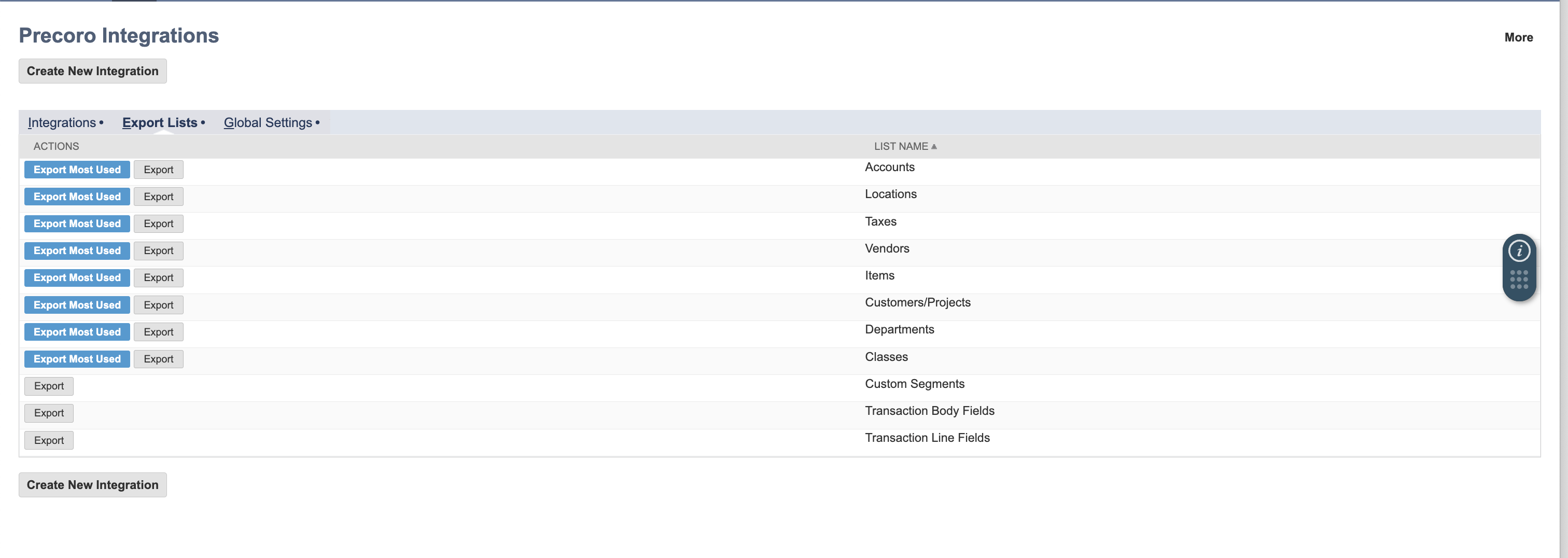
1. Open Export Lists
In Precoro Integrations, go to the Export Lists tab.
We offer Smart Integration for the following entities:
-
Accounts
-
Vendors
-
Items
-
Customers / Projects
-
Departments
-
Classes
-
Locations
-
Taxes
2. Run Smart Export
To start the smart export process, click the Export Most Used opposite the needed entity.
You can still perform manual export if necessary by pressing the Export button.
3. Background Processing
Precoro will analyze historical data and import only the options you used in the last 12 months.
4. Export ResultAfter the process is completed, you will get:
-
Automatically created
-
Custom Document Fields,
-
Custom Item Fields.
-
-
Only relevant (most used) options integrated into Precoro.