
See the Full Cost of Purchase Requisitions with Taxes and Discounts
Add taxes and supplier discounts to purchase requisitions to see the final amount you’ll pay before a request becomes a PO. No more calculating it by hand, and PR and PO totals are easy to compare.
You’ll find both in the totals panel of the PR:
- Taxes: click + next to Taxes and choose a tax from those set up in your company’s configuration. Add as many taxes as you need.
- Discounts: click + next to Discounts and enter a percentage. The discount applies to every item in the PR, including items you add later. If you add several discounts, they add up.
To set them for a single item, edit the item and click + in its Tax or Discount column.
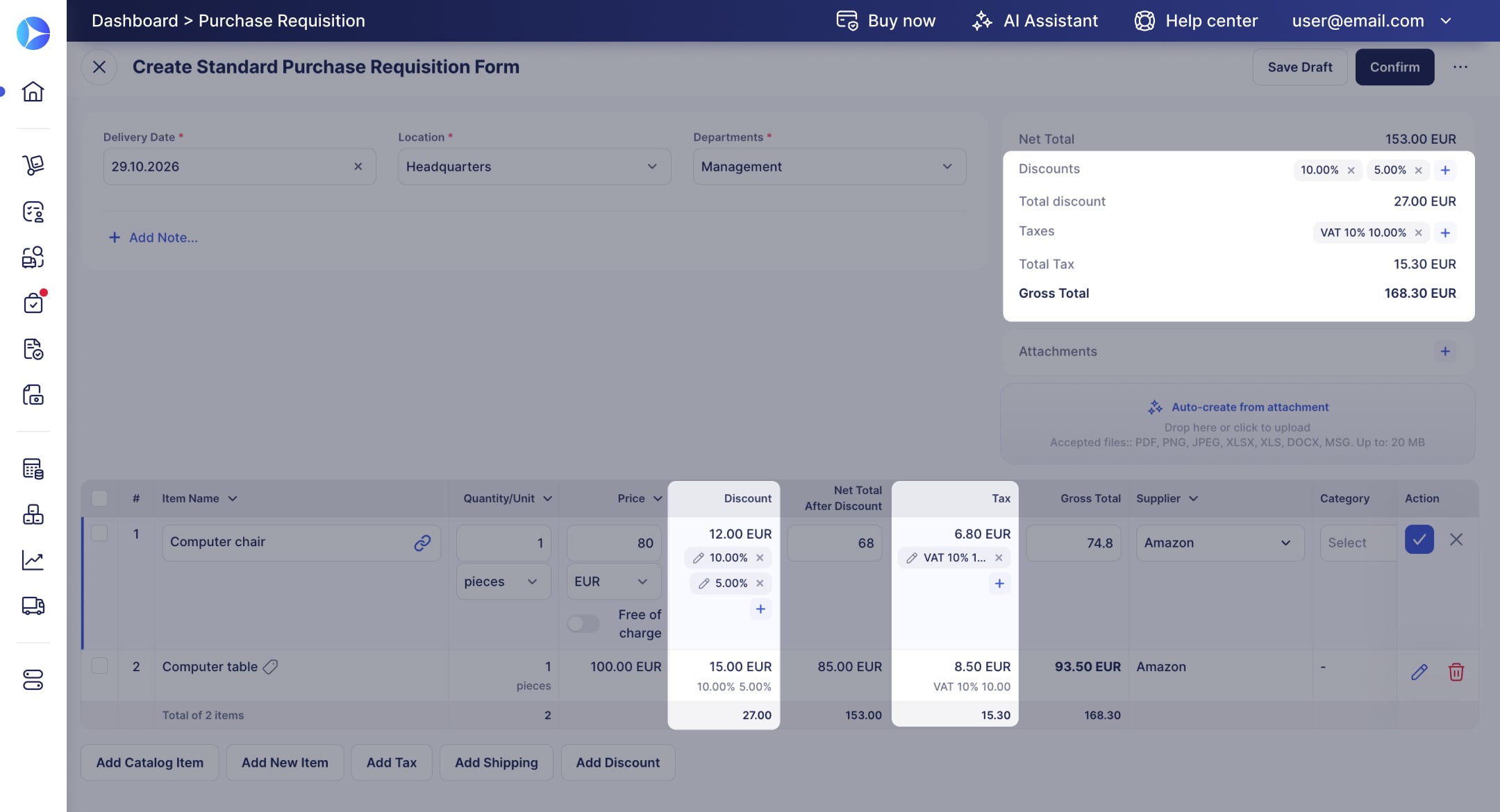
Total discount, Total Tax, and Gross Total update as soon as you add a tax or discount, and both are calculated just like on POs. When you create a PO from the PR, taxes and discounts carry over automatically. They also appear on PDF and XLSX exports.
Withholding taxes aren’t available on PRs yet.