---
title: NetSuite Transaction Body Fields Integration
description: Discover how to configure NetSuite Transaction Body Fields integration with the Precoro SuiteApp.
---
[Skip to content](https://help.precoro.com/how-to-sync-transaction-body-fields-with-netsuite-suiteapp#main-content)
[Contact us](https://help.precoro.com/kb-tickets/new?hsLang=en) [Customer portal](https://help.precoro.com/tickets-view?hsLang=en)
[](https://app.precoro.com/login)
Open main navigation
Close main navigation
- [Contact us](https://help.precoro.com/kb-tickets/new)
- [Customer portal](https://help.precoro.com/tickets-view)
- [Contact Us](https://share.hsforms.com/1-5JilMA_Qv6AOSVjFtNhDg14slf)
[Contact Us](https://share.hsforms.com/1-5JilMA_Qv6AOSVjFtNhDg14slf)
Hi there! How can we help you today?
- There are no suggestions because the search field is empty.
1. [Knowledge Base](https://help.precoro.com/?hsLang=en)
2. [Precoro Integrations](https://help.precoro.com/precoro-integrations?hsLang=en)
3. [NetSuite Integration](https://help.precoro.com/precoro-integrations?hsLang=en#netsuite-integration)
# NetSuite Transaction Body Fields Integration
## Learn how to set up NetSuite Transaction Body Fields integration to customize your documents and reports based on your business needs.
#### TABLE OF CONTENTS
- [Supported Transaction Body Field Types](https://help.precoro.com/how-to-sync-transaction-body-fields-with-netsuite-suiteapp#types)
- [How to Export Date and Free-Form Text Transaction Body Fields from NetSuite](https://help.precoro.com/how-to-sync-transaction-body-fields-with-netsuite-suiteapp#date-text-types)
- [How to Export List/Record Transaction Body Fields from NetSuite](https://help.precoro.com/how-to-sync-transaction-body-fields-with-netsuite-suiteapp#list-record-type)
- [How to Grant Access to Specific List/Record Transaction Body Fields](https://help.precoro.com/how-to-sync-transaction-body-fields-with-netsuite-suiteapp#access)
- [Character Limits for the Transaction Body Field of Free-Form Text Type](https://help.precoro.com/how-to-sync-transaction-body-fields-with-netsuite-suiteapp#limits)
### Supported Transaction Body Field Types
Precoro supports the integration of Transaction Body Fields of the **Date**, **Free-Form Text**, and **Lists/Records** types.
In Precoro, these fields appear as **Custom Fields for Documents**.
### How to Export Date and Free-Form Text Transaction Body Fields from NetSuite
To export NetSuite Transaction Body Fields of the Date and Free-Form Text types into Precoro, follow these steps:
1. In NetSuite, navigate to **Precoro → Configuration → Integrations.**
2. Open the **Export Lists** tab → click **Export** next to Transaction Body Fields. It may take some time for the next page to load.
3. On the **Transaction Body Fields Export** page, the fields of Date and Free-Form Text types will appear. Select the needed ones or **Mark All.**
4. Click **Export** to complete the process. It may take up to 15 seconds for the Transaction Body Fields to appear in Precoro.
### How to Export List/Record Transaction Body Fields from NetSuite
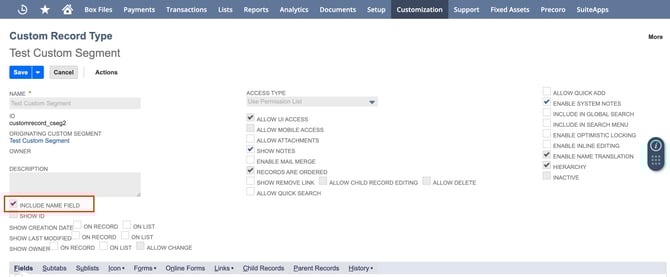
Before exporting List/Record Transaction Body Fields, ensure the **Include Name Field** setting is enabled in all necessary **Custom Record Types**. This configuration allows you to export Custom Body Fields with default values needed for synchronization with Precoro.
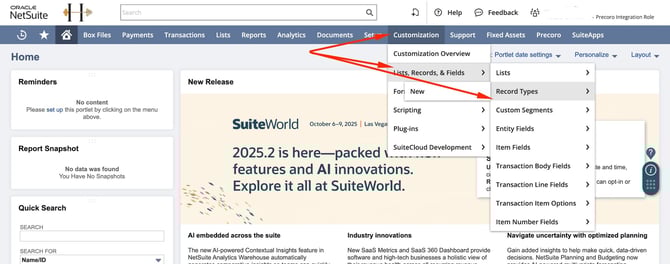
First, navigate to Customization **→** Lists, Records & Fields **→** Record Types.
[](https://help.precoro.com/hubfs/Record%20Types.jpg?hsLang=en)
Find the Custom Record Types selected in Custom Body Fields you want to export. Open each of them to view the details, enable the **Include Name Field** setting, and save the changes.
[](https://help.precoro.com/hubfs/Include%20name%20field.jpg?hsLang=en)
To export NetSuite Transaction Body Fields of the List/Record type:
1. In NetSuite, navigate to **Precoro → Configuration → Integrations.**
2. Open the **Export Lists** tab → click **Export** next to Transaction Body Fields. It may take some time for the next page to load.
3. Switch to the **List/Record Transaction Body Fields** tab → click **Continue** next to the needed field.
4. On the next page, select the Transaction Body Field values to export, or click **Mark All** to select all records on the current page. When switching pages, the record selection will be reset. Therefore, each page must be exported separately.
5. Click the **Export** button to complete the process. It may take up to 15 seconds for the Transaction Body Field to appear in Precoro.
**💡Please note:** For large numbers of values, the integration will occur in batches, and the data will appear in Precoro gradually.
#### How to Grant Access to Specific List/Record Transaction Body Fields
To integrate the **List/Record** type Transaction Body Fields, the **Precoro Integration Role** may require additional permissions. If no records appear on the **Transaction Body Fields Export** page, it likely means access has not been granted.
Follow these steps in NetSuite to update the permissions:
1. Navigate to **Setup → User/Roles → Manage Roles.**
2. Click **Edit** next to the Precoro Integration Role.
3. On the **Role** page, open the **Permissions** tab.
4. Under the appropriate sub-tab (**Lists** for list types or **Custom Record** for record types), **select** the required list or record from the drop-down menu.
5. Set the access level to **Full →** click **Add.**
6. Repeat for other lists or records if needed.
7. Click **Save** to record the changes.
### Character Limits for the Transaction Body Field of Free-Form Text Type
Transaction Body Fields of the Free-Form Text type are limited to 300 characters. You cannot enter more than this in either NetSuite or Precoro.
- [Precoro Setup](https://help.precoro.com/precoro-setup?hsLang=en#main-content)
- [Configurations](https://help.precoro.com/precoro-setup?hsLang=en#configurations)
- [User Management](https://help.precoro.com/precoro-setup?hsLang=en#user-management)
- [Custom Fields and Forms](https://help.precoro.com/precoro-setup?hsLang=en#custom-fields-and-forms)
- [Supplier management](https://help.precoro.com/precoro-setup?hsLang=en#supplier-management)
- [Working with Items](https://help.precoro.com/precoro-setup?hsLang=en#working-with-items)
- [Approval Workflow](https://help.precoro.com/precoro-setup?hsLang=en#approval-workflow)
- [Location Management](https://help.precoro.com/precoro-setup?hsLang=en#location-management)
- [Precoro Payments](https://help.precoro.com/precoro-setup?hsLang=en#precoro-payments)
- [Two-factor authentication](https://help.precoro.com/precoro-setup?hsLang=en#two-factor-authentication)
- [Security](https://help.precoro.com/precoro-setup?hsLang=en#security)
- [US Based Server](https://help.precoro.com/precoro-setup?hsLang=en#us-based-server)
- [How to use Precoro](https://help.precoro.com/how-to-use-precoro?hsLang=en#main-content)
- [Warehouse Requests](https://help.precoro.com/how-to-use-precoro?hsLang=en#warehouse-requests)
- [Requests for Proposals](https://help.precoro.com/how-to-use-precoro?hsLang=en#requests-for-proposals)
- [Purchase Requisitions](https://help.precoro.com/how-to-use-precoro?hsLang=en#purchase-requisitions)
- [Purchase Orders](https://help.precoro.com/how-to-use-precoro?hsLang=en#purchase-orders)
- [Service Orders](https://help.precoro.com/how-to-use-precoro?hsLang=en#service-orders)
- [Receipts](https://help.precoro.com/how-to-use-precoro?hsLang=en#receipts)
- [Invoices](https://help.precoro.com/how-to-use-precoro?hsLang=en#invoices)
- [Expenses](https://help.precoro.com/how-to-use-precoro?hsLang=en#expenses)
- [Budgeting](https://help.precoro.com/how-to-use-precoro?hsLang=en#budgeting)
- [Inventory](https://help.precoro.com/how-to-use-precoro?hsLang=en#inventory)
- [Reports](https://help.precoro.com/how-to-use-precoro?hsLang=en#reports)
- [AP Inbox and Intelligent AP Automation](https://help.precoro.com/how-to-use-precoro?hsLang=en#ap-inbox-and-intelligent-ap-automation)
- [Working with documents](https://help.precoro.com/how-to-use-precoro?hsLang=en#working-with-documents)
- [Suppliers Portal](https://help.precoro.com/how-to-use-precoro?hsLang=en#suppliers-portal)
- [Supplier Registration](https://help.precoro.com/how-to-use-precoro?hsLang=en#supplier-registration)
- [Attachments, Filters, and Search](https://help.precoro.com/how-to-use-precoro?hsLang=en#attachments-filters-and-search)
- [Mobile App](https://help.precoro.com/how-to-use-precoro?hsLang=en#mobile-app)
- [FAQs and Troubleshooting](https://help.precoro.com/how-to-use-precoro?hsLang=en#faqs-and-troubleshooting)
- [Precoro Integrations](https://help.precoro.com/precoro-integrations?hsLang=en#main-content)
- [QuickBooks Online Integration](https://help.precoro.com/precoro-integrations?hsLang=en#quickbooks-online-integration)
- [NetSuite Integration](https://help.precoro.com/precoro-integrations?hsLang=en#netsuite-integration)
- [Xero Integration](https://help.precoro.com/precoro-integrations?hsLang=en#xero-integration)
- [API Requests and Webhooks](https://help.precoro.com/precoro-integrations?hsLang=en#api-requests-and-webhooks)
- [SSO Setting](https://help.precoro.com/precoro-integrations?hsLang=en#sso-setting)
- [Google Integration](https://help.precoro.com/precoro-integrations?hsLang=en#google-integration)
- [Power BI](https://help.precoro.com/precoro-integrations?hsLang=en#power-bi)
- [Integration with Slack](https://help.precoro.com/precoro-integrations?hsLang=en#integration-with-slack)
- [PunchOut Catalogs](https://help.precoro.com/precoro-integrations?hsLang=en#punchout-catalogs)
- [Integrations via Connectors](https://help.precoro.com/precoro-integrations?hsLang=en#integrations-via-connectors)
- [Bill.com Integration](https://help.precoro.com/precoro-integrations?hsLang=en#bill-com-integration)
- [Integration with Microsoft Teams](https://help.precoro.com/precoro-integrations?hsLang=en#integration-with-microsoft-teams)
- [Precoro Updates](https://help.precoro.com/precoro-updates?hsLang=en#main-content)
- [Releases, 2026](https://help.precoro.com/precoro-updates?hsLang=en#releases-2026)
- [Releases, 2025](https://help.precoro.com/precoro-updates?hsLang=en#releases-2025)
- [Releases, 2024](https://help.precoro.com/precoro-updates?hsLang=en#releases-2024)
- [Releases, 2023](https://help.precoro.com/precoro-updates?hsLang=en#releases-2023)
- [API Updates](https://help.precoro.com/precoro-updates?hsLang=en#api-updates)
- [General changes](https://help.precoro.com/precoro-updates?hsLang=en#general-changes)
[](https://precoro.com/)
Copyright © 2026, Precoro
```json
{
"@context" : "https://schema.org",
"@type" : "VideoObject",
"contentUrl" : "https://1903299.fs1.hubspotusercontent-na1.net/hubfs/1903299/Export-1.mp4",
"dateModified" : "2025-05-14T20:43:25.720Z",
"duration" : "PT31S",
"height" : 1798,
"name" : "Export-1",
"thumbnailUrl" : "https://1903299.fs1.hubspotusercontent-na1.net/hubfs/1903299/Export-1.mp4/medium.jpg",
"uploadDate" : "2025-05-14T20:43:19.931Z",
"width" : 3832
}
```
```json
{
"@context" : "https://schema.org",
"@type" : "VideoObject",
"contentUrl" : "https://1903299.fs1.hubspotusercontent-na1.net/hubfs/1903299/Lists%20Records%20Export.mp4",
"dateModified" : "2025-05-14T20:51:04.259Z",
"duration" : "PT39S",
"height" : 1798,
"name" : "Lists Records Export",
"thumbnailUrl" : "https://1903299.fs1.hubspotusercontent-na1.net/hubfs/1903299/Lists%20Records%20Export.mp4/medium.jpg",
"uploadDate" : "2025-05-14T20:50:55.145Z",
"width" : 3832
}
```
```json
{
"@context" : "https://schema.org",
"@type" : "VideoObject",
"contentUrl" : "https://1903299.fs1.hubspotusercontent-na1.net/hubfs/1903299/Edit%20Permissions.mp4",
"dateModified" : "2025-05-14T21:22:09.145Z",
"duration" : "PT56S",
"height" : 1798,
"name" : "Edit Permissions",
"thumbnailUrl" : "https://1903299.fs1.hubspotusercontent-na1.net/hubfs/1903299/Edit%20Permissions.mp4/medium.jpg",
"uploadDate" : "2025-05-14T21:22:05.830Z",
"width" : 3832
}
```