---
title: How to Request a New Feature or Share Feedback
description: Learn how to submit a new feature request, upvote an existing idea, or share your feedback in Precoro.
---
[Skip to content](https://help.precoro.com/how-to-request-a-new-feature-or-share-feedback#main-content)
[Contact us](https://help.precoro.com/kb-tickets/new?hsLang=en) [Customer portal](https://help.precoro.com/tickets-view?hsLang=en)
[](https://app.precoro.com/login)
Open main navigation
Close main navigation
- [Contact us](https://help.precoro.com/kb-tickets/new)
- [Customer portal](https://help.precoro.com/tickets-view)
- [Contact Us](https://share.hsforms.com/1-5JilMA_Qv6AOSVjFtNhDg14slf)
[Contact Us](https://share.hsforms.com/1-5JilMA_Qv6AOSVjFtNhDg14slf)
Hi there! How can we help you today?
- There are no suggestions because the search field is empty.
1. [Knowledge Base](https://help.precoro.com/?hsLang=en)
2. [How to use Precoro](https://help.precoro.com/how-to-use-precoro?hsLang=en)
3. [FAQs and Troubleshooting](https://help.precoro.com/how-to-use-precoro?hsLang=en#faqs-and-troubleshooting)
# How to Request a New Feature or Share Feedback
## Discover how to submit a new feature request, upvote ideas, and share your feedback to shape the future of Precoro through our open product roadmap.
#### TABLE OF CONTENTS
- [Open Product Roadmap Overview](https://help.precoro.com/how-to-request-a-new-feature-or-share-feedback#overview)
- [Working with the Open Product Roadmap](https://help.precoro.com/how-to-request-a-new-feature-or-share-feedback#working-with-roadmap)
- [How to Submit a New Idea](https://help.precoro.com/how-to-request-a-new-feature-or-share-feedback#sumbit-ideas)
- [How to Upvote an Existing Request](https://help.precoro.com/how-to-request-a-new-feature-or-share-feedback#upvote)
- [How to Leave a Comment](https://help.precoro.com/how-to-request-a-new-feature-or-share-feedback#comment)
- [What Happens Next](https://help.precoro.com/how-to-request-a-new-feature-or-share-feedback#whats-next)
### Open Product Roadmap Overview
Have an idea to improve your workflow in Precoro? Or something you’d really like to see added? Now there’s a simple way to share it.
Our [open product roadmap](https://roadmap.precoro.com/roadmap) lets you explore what’s planned, in progress, or already released.
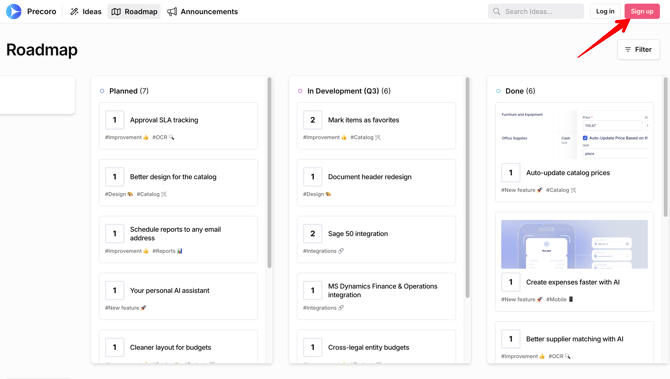
To take part in the conversation, simply **sign up** or **log in** with your email and password. It only takes a few seconds, and you’ll be able to:
- Share your own feature ideas
- Upvote requests from other users
- Leave comments to give context, share feedback, or ask questions
Your input helps us build the features that matter most to you.
[](https://help.precoro.com/hubfs/Sign%20Up.png?hsLang=en)
### Working with the Open Product Roadmap
You can view all current and planned product updates on Precoro’s open product roadmap without logging in.
To quickly find a specific idea, use the **Search Ideas** bar and type in keywords related to it.
You can also filter initiatives by functionality (for example, New Feature, Integrations, Approvals, etc.) by clicking the **Filter** button.
How to Submit a New Idea
To submit a new feature request:
1. Go to the [**Ideas**](https://roadmap.precoro.com/b/90p17qr0/feature-ideas) section.
2. Click the **+ Submit Idea** button in the top-right corner.
3. Fill in your request:
1. Describe what you’d like to see and why it’s important;
2. Add any specific context (e.g., your workflow, pain point, business case).
4. Click **Submit**—your idea will appear in the public list once approved.
#### How to Upvote an Existing Request
To support a new feature request that matter most to you:
1. Browse the [**Ideas**](https://roadmap.precoro.com/b/90p17qr0/feature-ideas) section or use the search bar.
2. Click the number box with the arrow next to any idea to upvote it.
The more votes an idea gets, the higher it rises in priority.
#### How to Leave a Comment
To share your use cases, thoughts, or questions about any feature:
1. Open any idea that interests you.
2. Scroll down to the **Comments** section.
3. Write your comment and click the **Add comment** button to submit it.
### What Happens Next
We regularly review submitted ideas, upvotes, and comments. While we can't guarantee implementation for every new feature request, your input directly influences our product direction.
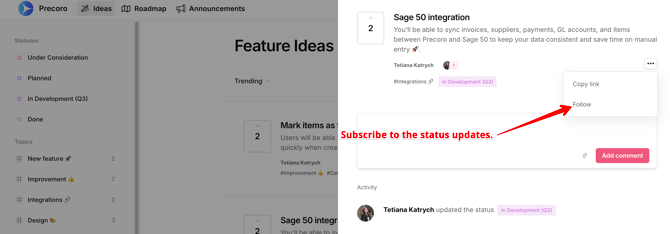
You can **follow** any idea to receive email notifications when its status changes—whether it moves to planning, development, or gets released.
[](https://help.precoro.com/hubfs/Follow.png?hsLang=en)
- [Precoro Setup](https://help.precoro.com/precoro-setup?hsLang=en#main-content)
- [Configurations](https://help.precoro.com/precoro-setup?hsLang=en#configurations)
- [User Management](https://help.precoro.com/precoro-setup?hsLang=en#user-management)
- [Custom Fields and Forms](https://help.precoro.com/precoro-setup?hsLang=en#custom-fields-and-forms)
- [Supplier management](https://help.precoro.com/precoro-setup?hsLang=en#supplier-management)
- [Working with Items](https://help.precoro.com/precoro-setup?hsLang=en#working-with-items)
- [Approval Workflow](https://help.precoro.com/precoro-setup?hsLang=en#approval-workflow)
- [Location Management](https://help.precoro.com/precoro-setup?hsLang=en#location-management)
- [Precoro Payments](https://help.precoro.com/precoro-setup?hsLang=en#precoro-payments)
- [Two-factor authentication](https://help.precoro.com/precoro-setup?hsLang=en#two-factor-authentication)
- [Security](https://help.precoro.com/precoro-setup?hsLang=en#security)
- [US Based Server](https://help.precoro.com/precoro-setup?hsLang=en#us-based-server)
- [How to use Precoro](https://help.precoro.com/how-to-use-precoro?hsLang=en#main-content)
- [Warehouse Requests](https://help.precoro.com/how-to-use-precoro?hsLang=en#warehouse-requests)
- [Requests for Proposals](https://help.precoro.com/how-to-use-precoro?hsLang=en#requests-for-proposals)
- [Purchase Requisitions](https://help.precoro.com/how-to-use-precoro?hsLang=en#purchase-requisitions)
- [Purchase Orders](https://help.precoro.com/how-to-use-precoro?hsLang=en#purchase-orders)
- [Service Orders](https://help.precoro.com/how-to-use-precoro?hsLang=en#service-orders)
- [Receipts](https://help.precoro.com/how-to-use-precoro?hsLang=en#receipts)
- [Invoices](https://help.precoro.com/how-to-use-precoro?hsLang=en#invoices)
- [Expenses](https://help.precoro.com/how-to-use-precoro?hsLang=en#expenses)
- [Budgeting](https://help.precoro.com/how-to-use-precoro?hsLang=en#budgeting)
- [Inventory](https://help.precoro.com/how-to-use-precoro?hsLang=en#inventory)
- [Reports](https://help.precoro.com/how-to-use-precoro?hsLang=en#reports)
- [AP Inbox and Intelligent AP Automation](https://help.precoro.com/how-to-use-precoro?hsLang=en#ap-inbox-and-intelligent-ap-automation)
- [Working with documents](https://help.precoro.com/how-to-use-precoro?hsLang=en#working-with-documents)
- [Suppliers Portal](https://help.precoro.com/how-to-use-precoro?hsLang=en#suppliers-portal)
- [Supplier Registration](https://help.precoro.com/how-to-use-precoro?hsLang=en#supplier-registration)
- [Attachments, Filters, and Search](https://help.precoro.com/how-to-use-precoro?hsLang=en#attachments-filters-and-search)
- [Mobile App](https://help.precoro.com/how-to-use-precoro?hsLang=en#mobile-app)
- [FAQs and Troubleshooting](https://help.precoro.com/how-to-use-precoro?hsLang=en#faqs-and-troubleshooting)
- [Precoro Integrations](https://help.precoro.com/precoro-integrations?hsLang=en#main-content)
- [QuickBooks Online Integration](https://help.precoro.com/precoro-integrations?hsLang=en#quickbooks-online-integration)
- [NetSuite Integration](https://help.precoro.com/precoro-integrations?hsLang=en#netsuite-integration)
- [Xero Integration](https://help.precoro.com/precoro-integrations?hsLang=en#xero-integration)
- [API Requests and Webhooks](https://help.precoro.com/precoro-integrations?hsLang=en#api-requests-and-webhooks)
- [SSO Setting](https://help.precoro.com/precoro-integrations?hsLang=en#sso-setting)
- [Google Integration](https://help.precoro.com/precoro-integrations?hsLang=en#google-integration)
- [Power BI](https://help.precoro.com/precoro-integrations?hsLang=en#power-bi)
- [Integration with Slack](https://help.precoro.com/precoro-integrations?hsLang=en#integration-with-slack)
- [PunchOut Catalogs](https://help.precoro.com/precoro-integrations?hsLang=en#punchout-catalogs)
- [Integrations via Connectors](https://help.precoro.com/precoro-integrations?hsLang=en#integrations-via-connectors)
- [Bill.com Integration](https://help.precoro.com/precoro-integrations?hsLang=en#bill-com-integration)
- [Integration with Microsoft Teams](https://help.precoro.com/precoro-integrations?hsLang=en#integration-with-microsoft-teams)
- [Precoro Updates](https://help.precoro.com/precoro-updates?hsLang=en#main-content)
- [Releases, 2026](https://help.precoro.com/precoro-updates?hsLang=en#releases-2026)
- [Releases, 2025](https://help.precoro.com/precoro-updates?hsLang=en#releases-2025)
- [Releases, 2024](https://help.precoro.com/precoro-updates?hsLang=en#releases-2024)
- [Releases, 2023](https://help.precoro.com/precoro-updates?hsLang=en#releases-2023)
- [API Updates](https://help.precoro.com/precoro-updates?hsLang=en#api-updates)
- [General changes](https://help.precoro.com/precoro-updates?hsLang=en#general-changes)
[](https://precoro.com/)
Copyright © 2026, Precoro
```json
{
"@context" : "https://schema.org",
"@type" : "VideoObject",
"contentUrl" : "https://1903299.fs1.hubspotusercontent-na1.net/hubfs/1903299/Filter.mp4",
"dateModified" : "2025-08-26T11:15:03.638Z",
"duration" : "PT28S",
"height" : 1080,
"name" : "Filter",
"thumbnailUrl" : "https://1903299.fs1.hubspotusercontent-na1.net/hubfs/1903299/Filter.mp4/medium.jpg",
"uploadDate" : "2025-08-26T11:15:00.245Z",
"width" : 1920
}
```
```json
{
"@context" : "https://schema.org",
"@type" : "VideoObject",
"contentUrl" : "https://1903299.fs1.hubspotusercontent-na1.net/hubfs/1903299/New%20Idea.mp4",
"dateModified" : "2025-07-09T10:31:15.515Z",
"duration" : "PT23S",
"height" : 1080,
"name" : "New Idea",
"thumbnailUrl" : "https://1903299.fs1.hubspotusercontent-na1.net/hubfs/1903299/New%20Idea.mp4/medium.jpg",
"uploadDate" : "2025-07-09T10:31:12.460Z",
"width" : 1920
}
```
```json
{
"@context" : "https://schema.org",
"@type" : "VideoObject",
"contentUrl" : "https://1903299.fs1.hubspotusercontent-na1.net/hubfs/1903299/Upvote.mp4",
"dateModified" : "2025-07-09T10:32:46.724Z",
"duration" : "PT16S",
"height" : 1080,
"name" : "Upvote",
"thumbnailUrl" : "https://1903299.fs1.hubspotusercontent-na1.net/hubfs/1903299/Upvote.mp4/medium.jpg",
"uploadDate" : "2025-07-09T10:32:43.872Z",
"width" : 1920
}
```
```json
{
"@context" : "https://schema.org",
"@type" : "VideoObject",
"contentUrl" : "https://1903299.fs1.hubspotusercontent-na1.net/hubfs/1903299/Comment.mp4",
"dateModified" : "2025-07-09T10:33:24.735Z",
"duration" : "PT9S",
"height" : 1080,
"name" : "Comment",
"thumbnailUrl" : "https://1903299.fs1.hubspotusercontent-na1.net/hubfs/1903299/Comment.mp4/medium.jpg",
"uploadDate" : "2025-07-09T10:33:21.761Z",
"width" : 1920
}
```