---
title: How to Create an Invoice Custom Report
description: Add and Use Filters in Your Report View Purchaser Data from the Custom Invoice Reports In Precoro, you can quickly and effectively gather the necessary data for analyses using the custom reports funct
---
[Skip to content](https://help.precoro.com/how-to-create-an-invoice-custom-report#main-content)
[Contact us](https://help.precoro.com/kb-tickets/new?hsLang=en) [Customer portal](https://help.precoro.com/tickets-view?hsLang=en)
[](https://app.precoro.com/login)
Open main navigation
Close main navigation
- [Contact us](https://help.precoro.com/kb-tickets/new)
- [Customer portal](https://help.precoro.com/tickets-view)
- [Contact Us](https://share.hsforms.com/1-5JilMA_Qv6AOSVjFtNhDg14slf)
[Contact Us](https://share.hsforms.com/1-5JilMA_Qv6AOSVjFtNhDg14slf)
Hi there! How can we help you today?
- There are no suggestions because the search field is empty.
1. [Knowledge Base](https://help.precoro.com/?hsLang=en)
2. [How to use Precoro](https://help.precoro.com/how-to-use-precoro?hsLang=en)
3. [Reports](https://help.precoro.com/how-to-use-precoro?hsLang=en#reports)
# How to Create an Invoice Custom Report
## Learn how to create an Invoice custom report in Precoro.
#### TABLE OF CONTENTS
- [How to Create an Invoice Custom Report](https://help.precoro.com/how-to-create-an-invoice-custom-report#How-to-Create)
- [Add and Use Filters in Your Report](https://help.precoro.com/how-to-create-an-invoice-custom-report#Add-and-Use-Filters)
- [View Purchaser Data from the Custom Invoice Reports](https://help.precoro.com/how-to-create-an-invoice-custom-report#Added-Purchaser-Data)
### How to Create an Invoice Custom Report
In Precoro, you can quickly and effectively gather the necessary data for analyses using the custom reports functionality. Read [this article](https://help.precoro.com/how-to-create-a-custom-report?hsLang=en) to learn how to use custom reports to your maximum benefit.
**💡 Please note:** Invoice type ofCustom Report is available only for users with active **Report** and **Invoice** roles.
**Invoice Custom Report** allows you to generate any data set describing all Invoices you have access to in Precoro. After running, the custom report can be downloaded and shared as explained [here](https://help.precoro.com/how-to-export-and-share-reports?hsLang=en). Thus, you can gather, filter, process, analyze, and use any information about Invoices.
Generally, there are two ways you can build an Invoice Custom Report:
1. **By documents,** using only General, Supplier, and/or Company data
2. **By items,** using Items (and other) data.
**💡 Please note:** You can filter the Invoice Custom Report by Items and Documents Custom Fields.
Please make sure you have activated Items Custom Fields for the Invoices to see them in the Reports filters.
Find detailed instructions on how to activate Items Custom Fields for documents [here](https://help.precoro.com/functionality-of-items-custom-fields-1?hsLang=en#Activating).
Let’s consider an example of an Invoice Custom Report by Documents. This reporting type is applicable when you need to generally analyze your invoices and cluster documents by specific features without diving into items.
Let’s say you want to create a payment calendar for your Accountant based on Invoices created in Precoro. To do this, you need a list of Invoices filtered by status (we need only approved and partly paid documents) with the following indicated parameters:
- Invoice Due Date — to understand when you should pay.
- To Pay — to know how much you should pay.
- Budget Name and Parent Budget — to be aware of the payment money source.
- Supplier — to see the payees.
Here is a guide on how to create such a report:
### Add and Use Filters in Your Report
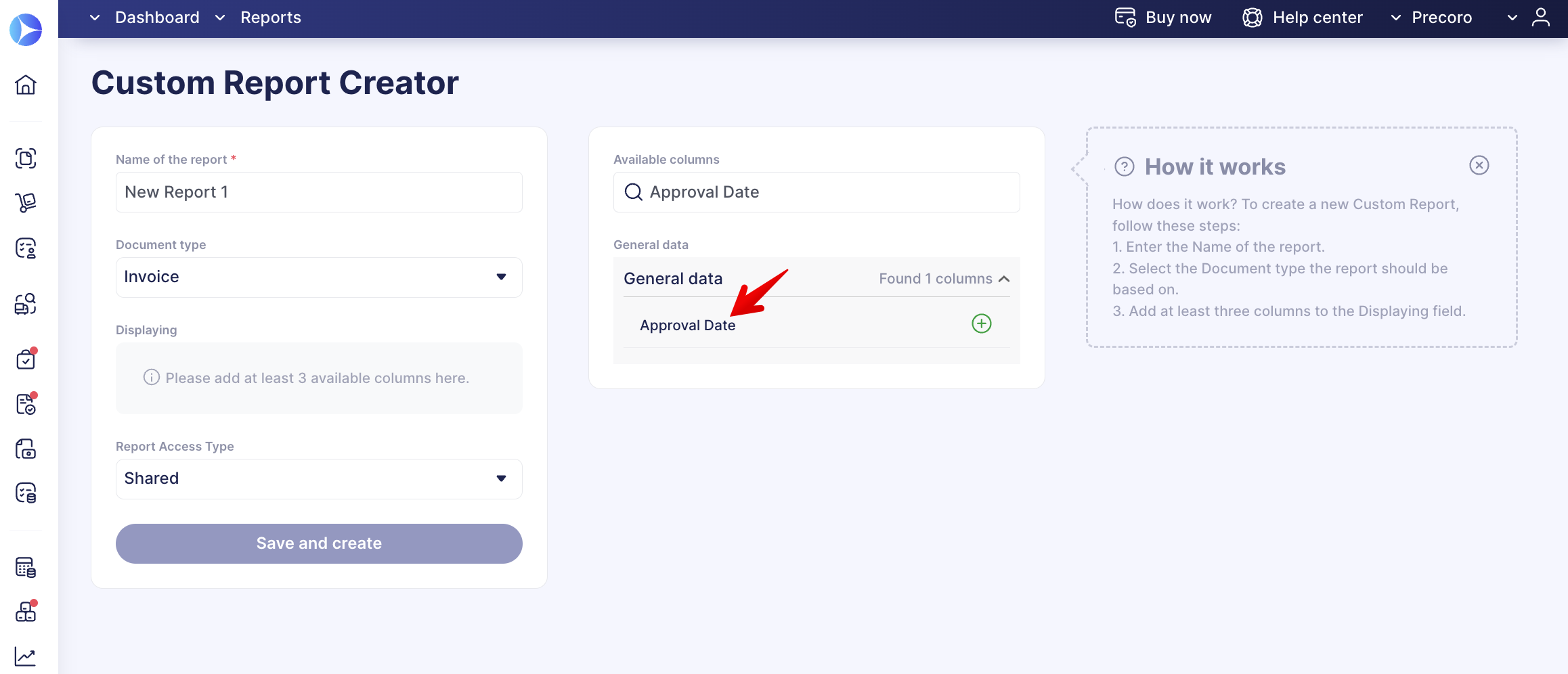
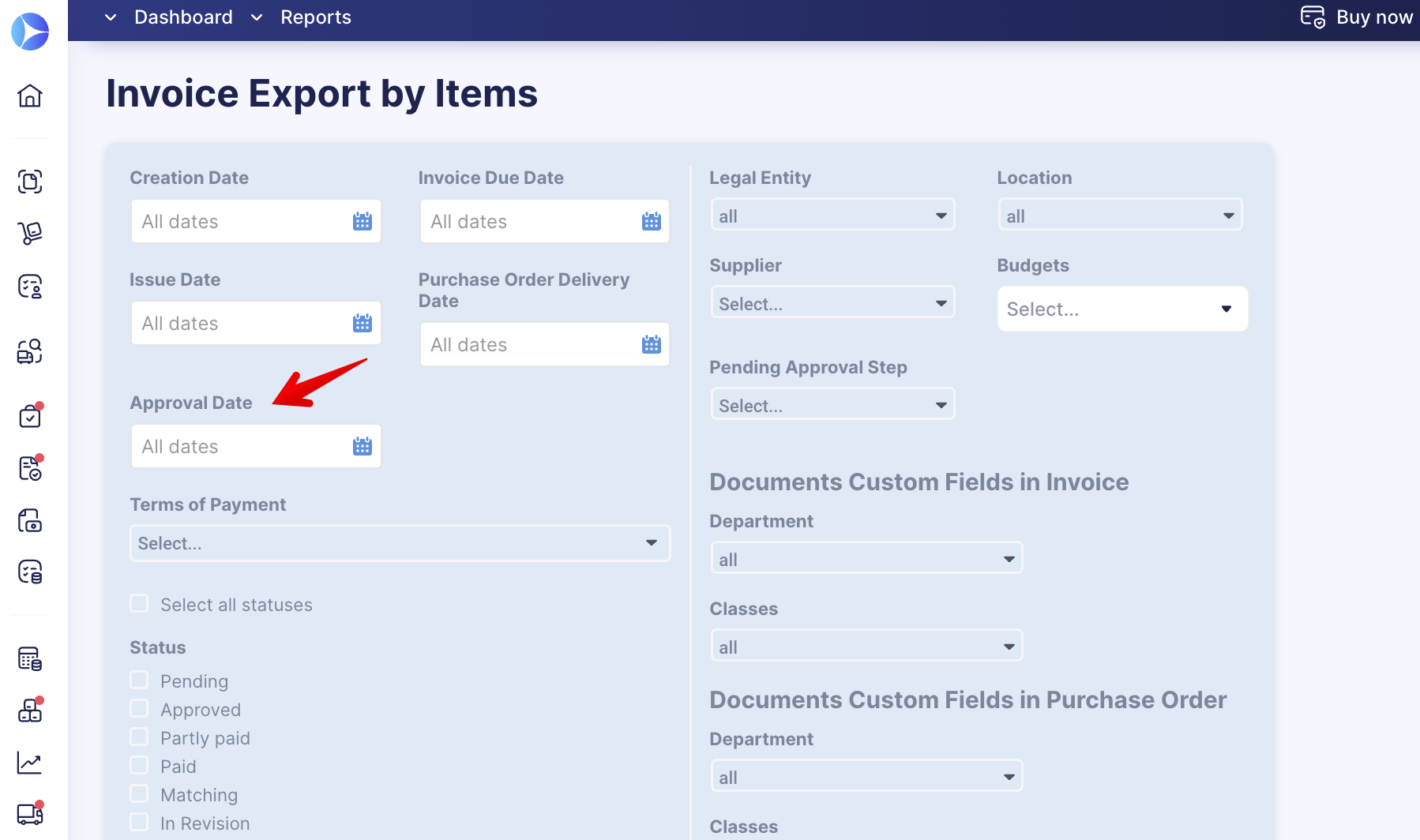
Use an **Approval Date Filter** that shows the final approval date (when the latest approver made a last document confirmation).
Using this filter, you can quickly obtain information on current **Approved Invoices ready for payment**. Filtering results will not contain documents on **re-approval** and with **In Revision** statuses.
The filter can be found:
- In **Custom Reports** with the **Invoice** document type.
- In preset **Invoice Export by Items** report.
### View Purchaser Data from the Custom Invoice Reports
You can receive more information about the Purchaser, from whom the action is required to create the Receipt document that blocks the Invoice.
**💡 Please note:** Open [this article](https://help.precoro.com/how-to-create-an-invoice-for-a-purchase-order-and-match-it-1?hsLang=en#three-way-match) to learn more about the **3-Way Match functionality**.
You can add **Purchaser Email** and **Purchaser** **Name** fields, from the **General** **Data** in the **Invoice Custom Report:**
- [Precoro Setup](https://help.precoro.com/precoro-setup?hsLang=en#main-content)
- [Configurations](https://help.precoro.com/precoro-setup?hsLang=en#configurations)
- [User Management](https://help.precoro.com/precoro-setup?hsLang=en#user-management)
- [Custom Fields and Forms](https://help.precoro.com/precoro-setup?hsLang=en#custom-fields-and-forms)
- [Supplier management](https://help.precoro.com/precoro-setup?hsLang=en#supplier-management)
- [Working with Items](https://help.precoro.com/precoro-setup?hsLang=en#working-with-items)
- [Approval Workflow](https://help.precoro.com/precoro-setup?hsLang=en#approval-workflow)
- [Location Management](https://help.precoro.com/precoro-setup?hsLang=en#location-management)
- [Precoro Payments](https://help.precoro.com/precoro-setup?hsLang=en#precoro-payments)
- [Two-factor authentication](https://help.precoro.com/precoro-setup?hsLang=en#two-factor-authentication)
- [Security](https://help.precoro.com/precoro-setup?hsLang=en#security)
- [US Based Server](https://help.precoro.com/precoro-setup?hsLang=en#us-based-server)
- [How to use Precoro](https://help.precoro.com/how-to-use-precoro?hsLang=en#main-content)
- [Warehouse Requests](https://help.precoro.com/how-to-use-precoro?hsLang=en#warehouse-requests)
- [Requests for Proposals](https://help.precoro.com/how-to-use-precoro?hsLang=en#requests-for-proposals)
- [Purchase Requisitions](https://help.precoro.com/how-to-use-precoro?hsLang=en#purchase-requisitions)
- [Purchase Orders](https://help.precoro.com/how-to-use-precoro?hsLang=en#purchase-orders)
- [Service Orders](https://help.precoro.com/how-to-use-precoro?hsLang=en#service-orders)
- [Receipts](https://help.precoro.com/how-to-use-precoro?hsLang=en#receipts)
- [Invoices](https://help.precoro.com/how-to-use-precoro?hsLang=en#invoices)
- [Expenses](https://help.precoro.com/how-to-use-precoro?hsLang=en#expenses)
- [Budgeting](https://help.precoro.com/how-to-use-precoro?hsLang=en#budgeting)
- [Inventory](https://help.precoro.com/how-to-use-precoro?hsLang=en#inventory)
- [Reports](https://help.precoro.com/how-to-use-precoro?hsLang=en#reports)
- [AP Inbox and Intelligent AP Automation](https://help.precoro.com/how-to-use-precoro?hsLang=en#ap-inbox-and-intelligent-ap-automation)
- [Working with documents](https://help.precoro.com/how-to-use-precoro?hsLang=en#working-with-documents)
- [Suppliers Portal](https://help.precoro.com/how-to-use-precoro?hsLang=en#suppliers-portal)
- [Supplier Registration](https://help.precoro.com/how-to-use-precoro?hsLang=en#supplier-registration)
- [Attachments, Filters, and Search](https://help.precoro.com/how-to-use-precoro?hsLang=en#attachments-filters-and-search)
- [Mobile App](https://help.precoro.com/how-to-use-precoro?hsLang=en#mobile-app)
- [FAQs and Troubleshooting](https://help.precoro.com/how-to-use-precoro?hsLang=en#faqs-and-troubleshooting)
- [Precoro Integrations](https://help.precoro.com/precoro-integrations?hsLang=en#main-content)
- [QuickBooks Online Integration](https://help.precoro.com/precoro-integrations?hsLang=en#quickbooks-online-integration)
- [NetSuite Integration](https://help.precoro.com/precoro-integrations?hsLang=en#netsuite-integration)
- [Xero Integration](https://help.precoro.com/precoro-integrations?hsLang=en#xero-integration)
- [API Requests and Webhooks](https://help.precoro.com/precoro-integrations?hsLang=en#api-requests-and-webhooks)
- [SSO Setting](https://help.precoro.com/precoro-integrations?hsLang=en#sso-setting)
- [Google Integration](https://help.precoro.com/precoro-integrations?hsLang=en#google-integration)
- [Power BI](https://help.precoro.com/precoro-integrations?hsLang=en#power-bi)
- [Integration with Slack](https://help.precoro.com/precoro-integrations?hsLang=en#integration-with-slack)
- [PunchOut Catalogs](https://help.precoro.com/precoro-integrations?hsLang=en#punchout-catalogs)
- [Integrations via Connectors](https://help.precoro.com/precoro-integrations?hsLang=en#integrations-via-connectors)
- [Bill.com Integration](https://help.precoro.com/precoro-integrations?hsLang=en#bill-com-integration)
- [Integration with Microsoft Teams](https://help.precoro.com/precoro-integrations?hsLang=en#integration-with-microsoft-teams)
- [Precoro Updates](https://help.precoro.com/precoro-updates?hsLang=en#main-content)
- [Releases, 2026](https://help.precoro.com/precoro-updates?hsLang=en#releases-2026)
- [Releases, 2025](https://help.precoro.com/precoro-updates?hsLang=en#releases-2025)
- [Releases, 2024](https://help.precoro.com/precoro-updates?hsLang=en#releases-2024)
- [Releases, 2023](https://help.precoro.com/precoro-updates?hsLang=en#releases-2023)
- [API Updates](https://help.precoro.com/precoro-updates?hsLang=en#api-updates)
- [General changes](https://help.precoro.com/precoro-updates?hsLang=en#general-changes)
[](https://precoro.com/)
Copyright © 2026, Precoro
```json
{
"@context" : "https://schema.org",
"@type" : "VideoObject",
"contentUrl" : "https://1903299.fs1.hubspotusercontent-na1.net/hubfs/1903299/Monosnap%20screencast%202023-01-23%2007-56-02.mp4",
"dateModified" : "2023-05-23T10:55:32.369Z",
"duration" : "PT1M23S",
"height" : 1324,
"name" : "Monosnap screencast 2023-01-23 07-56-02",
"thumbnailUrl" : "https://1903299.fs1.hubspotusercontent-na1.net/hubfs/1903299/Monosnap%20screencast%202023-01-23%2007-56-02.mp4/medium.jpg",
"uploadDate" : "2023-01-23T06:00:24.860Z",
"width" : 2428
}
```
```json
{
"@context" : "https://schema.org",
"@type" : "VideoObject",
"contentUrl" : "https://1903299.fs1.hubspotusercontent-na1.net/hubfs/1903299/Monosnap%20screencast%202023-11-29%2008-13-29.mp4",
"dateModified" : "2023-11-29T08:47:36.784Z",
"duration" : "PT39S",
"height" : 1384,
"name" : "Monosnap screencast 2023-11-29 08-13-29",
"thumbnailUrl" : "https://1903299.fs1.hubspotusercontent-na1.net/hubfs/1903299/Monosnap%20screencast%202023-11-29%2008-13-29.mp4/medium.jpg",
"uploadDate" : "2023-11-29T06:17:26.292Z",
"width" : 2476
}
```