---
title: How to Automatically Update Catalog Prices from Your Last Purchase
description: Find out how to automate catalog price updates based on the latest approved documents to save time and avoid outdated pricing in requests.
---
[Skip to content](https://help.precoro.com/how-to-automatically-update-catalog-prices-from-your-last-purchase#main-content)
[Contact us](https://help.precoro.com/kb-tickets/new?hsLang=en) [Customer portal](https://help.precoro.com/tickets-view?hsLang=en)
[](https://app.precoro.com/login)
Open main navigation
Close main navigation
- [Contact us](https://help.precoro.com/kb-tickets/new)
- [Customer portal](https://help.precoro.com/tickets-view)
- [Contact Us](https://share.hsforms.com/1-5JilMA_Qv6AOSVjFtNhDg14slf)
[Contact Us](https://share.hsforms.com/1-5JilMA_Qv6AOSVjFtNhDg14slf)
Hi there! How can we help you today?
- There are no suggestions because the search field is empty.
1. [Knowledge Base](https://help.precoro.com/?hsLang=en)
2. [Precoro Setup](https://help.precoro.com/precoro-setup?hsLang=en)
3. [Working with Items](https://help.precoro.com/precoro-setup?hsLang=en#working-with-items)
# How to Automatically Update Catalog Prices from Your Last Purchase
## Learn how to automatically update catalog prices based on the latest approved purchase data—so your team always sees the most current item prices.
#### TABLE OF CONTENTS:
- [Feature Overview](https://help.precoro.com/how-to-automatically-update-catalog-prices-from-your-last-purchase#overview)
- [Enabling the Auto-Update Price Based on the Latest Purchase Setting](https://help.precoro.com/how-to-automatically-update-catalog-prices-from-your-last-purchase#how-to-enable)
- [Key Logic and Scenarios](https://help.precoro.com/how-to-automatically-update-catalog-prices-from-your-last-purchase#key-scenarios)
- [FAQs](https://help.precoro.com/how-to-automatically-update-catalog-prices-from-your-last-purchase#faqs)
### Feature Overview
When item prices frequently change, keeping your catalog accurate manually becomes time-consuming and error-prone.
The **Auto-Update Price Based on the Latest Purchase** feature helps you keep your catalog up to date without manual effort.
Once a Purchase Order or Invoice reaches the **Approved** status, Precoro checks if the item price in the document is different from the one in the catalog. If the document doesn’t go through the approval process, the price check happens when it reaches the **Completed** or **Paid** status.
If the price differs and the auto-update feature is enabled for the item, the catalog price is updated automatically.
**💡 Please note:** The last approved/completed/paid document sets the catalog price. For instance, if you approve a PO from May 15 after the PO from May 19, the catalog price will be updated according to the PO from May 15 since it was approved last.
Here’s how the feature improves your workflow:
- Removes the need for constant manual price checks
- Gives requesters the most accurate pricing
- Improves budget planning and forecasting
- Reduces mismatches between PRs, POs, and invoices
### Enabling the Auto-Update Price Based on the Latest Purchase Setting
To allow automatic price update for a specific item:
1. In the **Item Management** module, open the **Item Management** page.
2. Click **Edit** next to the item in question.
3. Enable the **Auto-Update Price Based on the Latest Purchase** checkbox.
4. Click **Save** to confirm changes.
Alternatively, if you want to enable the setting for all or multiple items simultaneously:
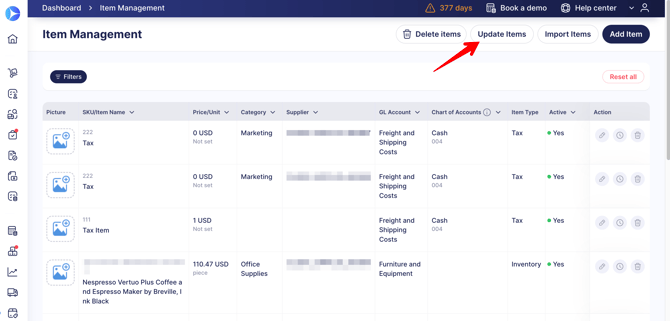
1. Click the **Update Items** button on the **Item Management** page.
[](https://help.precoro.com/hubfs/Update%20Items.png?hsLang=en)
2. Optionally, select the supplier and custom item fields (available in items).
3. Click the **Download** button.
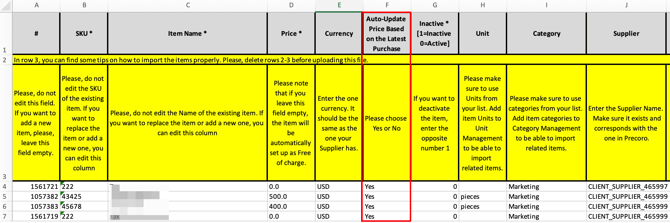
4. Open the downloaded file. Set ‘Yes’ in the **Auto-Update Price Based on the Latest Purchase** column for all the items you want to update.
[](https://help.precoro.com/hubfs/File.png?hsLang=en)
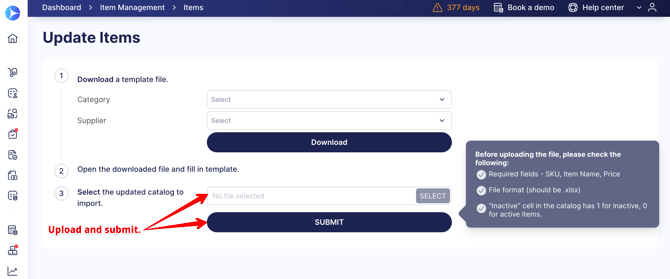
5. Save the file and upload it back to Precoro.
6. Click **Submit** to record the changes.
[](https://help.precoro.com/hubfs/Upload.png?hsLang=en)
### Key Logic and Scenarios
**💡 Please note:** The auto-update setting cannot be applied to the Service POs or Invoices from SPOs.
Precoro updates the item price in the catalog only if all of the following conditions are met:
- The **Auto-Update Price Based on the Latest Purchase** setting is enabled for the item.
- The item comes from the catalog and is added to a Purchase Order or Invoice.
- The price in the document is different from the current catalog price.
- The currency in the document matches the one in the catalog.
- The document has moved to one of the following statuses: **Approved**, **Completed**, or **Paid**.
- The document was created in Precoro, not imported.
| **Item name** | **Item price in a PO/Invoice** | **Item price in the catalog** | **Setting enabled?** | **Result** |
| --- | --- | --- | --- | --- |
| Phone | $12 | $11 | Yes | The catalog price will be updated. |
| Phone | $12 | €12 | Yes | The catalog price won’t be updated. |
| Phone | $12 | $11 | No | The catalog price won’t be updated. |
| Phone | $12 | €15 | Yes | The catalog price won’t be updated. |
- If a supplier is defined in the catalog, it must match the one in the document for the auto-update to work:
| **Item name** | **Item price in a PO/Invoice** | **Supplier in a PO/Invoice** | **Item price in the catalog** | **Supplier in the catalog** | **Setting enabled?** | **Result** |
| --- | --- | --- | --- | --- | --- | --- |
| Phone | $12 | Amazon | $11 | Amazon | Yes | The catalog price will be updated. |
| Phone | $12 | Amazon | $11 | Undefined | Yes | The catalog price will be updated. |
| Phone | $12 | Amazon | $11 | Staples | Yes | The catalog price won't be updated. |
### FAQs
**Can I filter items by auto-update status?**
Yes, you can use the corresponding filter on the Item Management page.
**How can I track the changes?**
You'll find all automatic price changes in the item revision history on the Item Management page, with Precoro shown as the reviser.
**Can I enable the auto-update setting when adding new items during the document creation?**
The Auto-Update Price Based on the Latest Purchase setting is disabled by default when you add items to the catalog during document creation. You can enable the setting only through the Item Management page.
**Will the catalog price be reverted if I cancel or delete the document?**
The last updated price will not be reverted automatically once the document is canceled or deleted.
- [Precoro Setup](https://help.precoro.com/precoro-setup?hsLang=en#main-content)
- [Configurations](https://help.precoro.com/precoro-setup?hsLang=en#configurations)
- [User Management](https://help.precoro.com/precoro-setup?hsLang=en#user-management)
- [Custom Fields and Forms](https://help.precoro.com/precoro-setup?hsLang=en#custom-fields-and-forms)
- [Supplier management](https://help.precoro.com/precoro-setup?hsLang=en#supplier-management)
- [Working with Items](https://help.precoro.com/precoro-setup?hsLang=en#working-with-items)
- [Approval Workflow](https://help.precoro.com/precoro-setup?hsLang=en#approval-workflow)
- [Location Management](https://help.precoro.com/precoro-setup?hsLang=en#location-management)
- [Precoro Payments](https://help.precoro.com/precoro-setup?hsLang=en#precoro-payments)
- [Two-factor authentication](https://help.precoro.com/precoro-setup?hsLang=en#two-factor-authentication)
- [Security](https://help.precoro.com/precoro-setup?hsLang=en#security)
- [US Based Server](https://help.precoro.com/precoro-setup?hsLang=en#us-based-server)
- [How to use Precoro](https://help.precoro.com/how-to-use-precoro?hsLang=en#main-content)
- [Warehouse Requests](https://help.precoro.com/how-to-use-precoro?hsLang=en#warehouse-requests)
- [Requests for Proposals](https://help.precoro.com/how-to-use-precoro?hsLang=en#requests-for-proposals)
- [Purchase Requisitions](https://help.precoro.com/how-to-use-precoro?hsLang=en#purchase-requisitions)
- [Purchase Orders](https://help.precoro.com/how-to-use-precoro?hsLang=en#purchase-orders)
- [Service Orders](https://help.precoro.com/how-to-use-precoro?hsLang=en#service-orders)
- [Receipts](https://help.precoro.com/how-to-use-precoro?hsLang=en#receipts)
- [Invoices](https://help.precoro.com/how-to-use-precoro?hsLang=en#invoices)
- [Expenses](https://help.precoro.com/how-to-use-precoro?hsLang=en#expenses)
- [Budgeting](https://help.precoro.com/how-to-use-precoro?hsLang=en#budgeting)
- [Inventory](https://help.precoro.com/how-to-use-precoro?hsLang=en#inventory)
- [Reports](https://help.precoro.com/how-to-use-precoro?hsLang=en#reports)
- [AP Inbox and Intelligent AP Automation](https://help.precoro.com/how-to-use-precoro?hsLang=en#ap-inbox-and-intelligent-ap-automation)
- [Working with documents](https://help.precoro.com/how-to-use-precoro?hsLang=en#working-with-documents)
- [Suppliers Portal](https://help.precoro.com/how-to-use-precoro?hsLang=en#suppliers-portal)
- [Supplier Registration](https://help.precoro.com/how-to-use-precoro?hsLang=en#supplier-registration)
- [Attachments, Filters, and Search](https://help.precoro.com/how-to-use-precoro?hsLang=en#attachments-filters-and-search)
- [Mobile App](https://help.precoro.com/how-to-use-precoro?hsLang=en#mobile-app)
- [FAQs and Troubleshooting](https://help.precoro.com/how-to-use-precoro?hsLang=en#faqs-and-troubleshooting)
- [Precoro Integrations](https://help.precoro.com/precoro-integrations?hsLang=en#main-content)
- [QuickBooks Online Integration](https://help.precoro.com/precoro-integrations?hsLang=en#quickbooks-online-integration)
- [NetSuite Integration](https://help.precoro.com/precoro-integrations?hsLang=en#netsuite-integration)
- [Xero Integration](https://help.precoro.com/precoro-integrations?hsLang=en#xero-integration)
- [API Requests and Webhooks](https://help.precoro.com/precoro-integrations?hsLang=en#api-requests-and-webhooks)
- [SSO Setting](https://help.precoro.com/precoro-integrations?hsLang=en#sso-setting)
- [Google Integration](https://help.precoro.com/precoro-integrations?hsLang=en#google-integration)
- [Power BI](https://help.precoro.com/precoro-integrations?hsLang=en#power-bi)
- [Integration with Slack](https://help.precoro.com/precoro-integrations?hsLang=en#integration-with-slack)
- [PunchOut Catalogs](https://help.precoro.com/precoro-integrations?hsLang=en#punchout-catalogs)
- [Integrations via Connectors](https://help.precoro.com/precoro-integrations?hsLang=en#integrations-via-connectors)
- [Bill.com Integration](https://help.precoro.com/precoro-integrations?hsLang=en#bill-com-integration)
- [Integration with Microsoft Teams](https://help.precoro.com/precoro-integrations?hsLang=en#integration-with-microsoft-teams)
- [Precoro Updates](https://help.precoro.com/precoro-updates?hsLang=en#main-content)
- [Releases, 2026](https://help.precoro.com/precoro-updates?hsLang=en#releases-2026)
- [Releases, 2025](https://help.precoro.com/precoro-updates?hsLang=en#releases-2025)
- [Releases, 2024](https://help.precoro.com/precoro-updates?hsLang=en#releases-2024)
- [Releases, 2023](https://help.precoro.com/precoro-updates?hsLang=en#releases-2023)
- [API Updates](https://help.precoro.com/precoro-updates?hsLang=en#api-updates)
- [General changes](https://help.precoro.com/precoro-updates?hsLang=en#general-changes)
[](https://precoro.com/)
Copyright © 2026, Precoro
```json
{
"@context" : "https://schema.org",
"@type" : "VideoObject",
"contentUrl" : "https://1903299.fs1.hubspotusercontent-na1.net/hubfs/1903299/Setting.mp4",
"dateModified" : "2025-06-19T10:14:27.728Z",
"duration" : "PT1M15S",
"height" : 1080,
"name" : "Setting",
"thumbnailUrl" : "https://1903299.fs1.hubspotusercontent-na1.net/hubfs/1903299/Setting.mp4/medium.jpg",
"uploadDate" : "2025-06-19T10:14:23.651Z",
"width" : 1920
}
```